Logo Colombia Colombia
NeatReceipts Scanalizer Professional 2.5 Escáner y software para dispositivos móviles disponible en Yaxa Colombia -15%

NeatReceipts Scanalizer Professional 2.5 Escáner y software para dispositivos móviles

Compra NeatReceipts Scanalizer Professional 2.5 Escáner y software para dispositivos móviles original con envío a todo Colombia

Productos de Oficina / Electrónicos de Oficina / Escáneres y Accesorios / Escáneres / Escáneres para Documentos

Precio y disponibilidad de NeatReceipts Scanalizer Professional 2.5 Escáner y software para dispositivos móviles

$ 576.960,45

$ 678.777

Addi

0 % de interés sin costos adicionales en 3 cuotas de $ 192.320 , pagando con Addi. Obtén tu cupo

Envío gratis a todo Colombia

Disponible en todos nuestros productos, sin costos ocultos ni mínimo de compra.

Stock disponible: 7 unidades en existencia.

Tiempo de entrega: Entrega internacional estimada de 4 a 7 dias habiles en Colombia.

🛒 Comprar ahora
Pago seguro garantizado

Valoración de clientes

3.2 sobre cinco estrellas 260 opiniones

Descripción del producto Los gastos de forma más fácil de administrar, para preparar los impuestos, crear gasto informes y escanea tarjetas -- aceptado por el IRS scans permanente digital copias de todos sus papeles, puede mantener un seguimiento de todos los tipos de documentos financieros y Pull función de ellos hasta como sea necesario con el nuevo documento Organizador funciona con quickbooks, Quicken, ms dinero, Excel, PDF, actuar., y Peachtree incluye software de neatreceipts y un ligero, color, escáner portátil, interfaz USB Tienda Tienda Product Description Please note: A 3.0 software upgrade for the NeatReceipts Scanalizer will be released on October 15, 2007. You may purchase the software upgrade at the NeatReceipts website: Neatreceipts/Upgrade NeatReceipts Version 2.5 Professional is the easiest way for individuals and small businesses to manage expenses, prepare for taxes, create expense reports, and scan business cards. But it not all just for business--you can also use Neat Receipts for scrapbooking, archiving family recipes, and other family activities. NeatReceipts Version 2.5 Professional edition also includes a new Document Organizer feature in addition to Receipts, Business Card, and Tax Organizers features. Use NeatReceipts 2.5 to manage expenses, prepare for taxes, create expense reports, and scan business cards. View example. Organize expenses by IRS form and category. View example. Sync contact information into Outlook, Plaxo or vCard. View example. Scan receipts and save in digital spreadsheet format. View example. Scan documents, recipes, and more and then convert them to PDF. View example. How NeatRecipts can Make Your Life Easier Make permanent digital copies of all your financial papers NeatReceipts 2.5 comes with a high resolution portable scanner. All you have to do is scan your receipts, invoices, and other financial documents through this scanner, and our software will save permanent copies that you can depend on for years to come. Eliminate financial data entry, simplifies expense tracking Using patent-pending NeatScan technology, NeatReceipts 2.5 extracts all important information from each receipt including date, amount, vendor and payment type. It then organizes all this expense information into a searchable expense database. Speed up tax preparation NeatReceipts allows you to leave digital comments on receipts and mark them for tax purposes. During tax season, retrieve all the marked receipts with ease and review those comments for easy preparation. NeatReceipts stores each receipt in a secure digital format that is accepted by the IRS. Integrate with QuickBooks, Quicken, Money, Act!, Peachtree Export to QuickBooks, MS Money, Quicken and most other financial software. By automating data entry and making it easy to export to other software, NeatReceipts makes sure you never have to type information into your financial software again! Scan business cards NeatReceipts captures key contact information from business cards and syncs with your Outlook address book. You can also create V-cards to upload to your PDA. Automatically create expense reports Automatically creates expense reports from scanned receipts and attaches images of the original receipts for simple verification. Users can email these reports from within the software or export them into PDF, DOC, XLS or HTML formats. If you are looking for expense reporting software with in-built approval, analysis and administration capabilities, please consider NeatReceipts Enterprise. How NeatReciepts Works NeatScan Technology Using advanced Optical Character Recognition, NeatScan technology (patent pending) extracts key information from your receipts, such as date, amount, payment method, expense category and vendor. If you scan in business cards, NeatScan automatically pulls out information like name, company, address, phone numbers, email address etc. NeatScan actually learns to associate an expense category (such as meals or lodging) to a particular vendor (brands such as Starbucks or Hilton) so you don't have to type in the information each time. This ensures that your financial records are filed consistently and with minimal effort. Each user of NeatReceipts Professional 2.5 receives the NeatReceipts scanner--a lightweight, portable, durable color scanner. Our software was designed with this scanner in mind and offers the following unmatched functionality: Auto-sizes any scanned receipt or document. Auto-crops and auto-rotates any scanned receipt or document. Scan widthwise or lengthwise -- the image will appear upright in image viewer. Powered by USB port, so no plug needed (it's truly portable!). Scans quickly and easily without opening and closing scanner lid (flatbed). Small, portable and lightweight. Perfect for the office, the home and the road! What New with NeatRecipts 2.5 NeatReceipts Professional 2.5 offer many new features like recognition of credit cards by last 4 digits, simplified and enhanced Advanced Fast Find for your folder and receipts, and added printing options that let you print one to four images per page and choice of paper size. Just like its previous version, NeatReceipts Professional 2.5 includes a business card reader at no additional charge. Simply scan your business cards and sync your contact information automatically with your Outlook address book, or create a V-Card for your palm pilot. Version 2.5 has the added convenience of Plaxo integration, so you can just go online, click "sync with Plaxo" and have your contact information updated. New in business card features in version 2.5 include an improved interface and parsing, both black & white and color scanning, one-click e-mail to and browse-to options, and completed action item check box column. Also, for the first time, NeatReceipts Scanalizer Professional Version 2.5 also includes a document organizer so you can keep track of all types of documents and access them up as needed. Document Organizer features include: Black & White and Color Scanning Document copier Copy Document command Ability to combine documents together Ability to separate multi-page documents What's in the Box Scanner, carrying case, stand

From the Manufacturer NeatReceipts is the easiest way for individuals and small businesses to manage expenses, prepare for taxes, create expense reports and scan business cards. The NeatReceipts package includes the proprietary NeatReceipts software and a lightweight, color, portable scanner. Features:Makes permanent digital copies of all your financial papers: NeatReceipts comes with a free, high resolution portable scanner. All you have to do is scan your receipts, invoices and other financial documents through this scanner, and our software will save permanent copies that you can depend on for years to come! Eliminates financial data entry, simplifies expense tracking: Using patent-pending NeatScan technology, NeatReceipts extracts all important information from each receipt including date, amount, vendor and payment type. It then organizes all this expense information into a searchable expense database. Speeds up tax preparation: NeatReceipts allows you to leave digital comments on receipts and mark them for tax purposes. During tax season, retrieve all the marked receipts with ease and review those comments for easy preparation. NeatReceipts stores each receipt in a secure digital format that is accepted by the IRS. Integrates with QuickBooks, Quicken, Money, Act!, Peachtree: Export to QuickBooks, MS Money, Quicken and most other financial software. By automating data entry and making it easy to export to other software, NeatReceipts makes sure you never have to type information into your financial software again! Scan business cards: NeatReceipts captures key contact information from business cards and syncs with your Outlook address book. You can also create V-cards to upload to your PDA. Automatically creates expense reports: Automatically creates expense reports from scanned receipts and attaches images of the original receipts for simple verification. Users can email these reports from within the software or export them into PDF, DOC, XLS or HTML formats. If you are looking for expense reporting software with in-built approval, analysis and administration capabilities, please consider NeatReceipts Enterprise. NeatScan Technology Using advanced Optical Character Recognition, NeatScan technology (patent pending) extracts key information from your receipts, such as date, amount, payment method, expense category and vendor. If you scan in business cards, NeatScan automatically pulls out information like name, company, address, phone numbers, email address etc. NeatScan actually learns to associate an expense category (such as meals or lodging) to a particular vendor (brands such as Starbucks or Hilton) so you don't have to type in the information each time. This ensures that your financial records are filed consistently and with minimal effort. The NeatReceipts portable scanner Each user of NeatReceipts Professional receives the NeatReceipts scanner -- a lightweight, portable, durable color scanner. Our software was designed with this scanner in mind and offers the following unmatched functionality: Auto-sizes any scanned receipt or document. Auto-crops and auto-rotates any scanned receipt or document. Scan widthwise or lengthwise -- the image will appear upright in image viewer. Powered by USB port, so no plug needed (it's truly portable!). Scans quickly and easily without opening and closing scanner lid (flatbed). Small, portable and lightweight. Perfect for the office, the home and the road! Links receipt to expense A high resolution image of every receipt is stored right next to its corresponding expense. This makes verification of expense reports a snap! The receipts are stored in a secure digital format, and cannot be edited once scanned in. The IRS accepts our secure digital format and this means you can throw away your tax-related receipts once they are scanned into NeatReceipts. Business Card Reader NeatReceipts Professional now includes a business card reader at no additional charge! Simply scan your business cards and sync your contact information automatically with your Outlook address book, or create a V-Card for your palm pilot. Integrates with QuickBooks. Creates expense reports in PDF, XLS and more NeatReceipts Professional can export all extracted and entered information to: Intuit QuickBooks Intuit Quicken Microsoft Money Other accounting software (through IIF and CSV formats) Microsoft Outlook (for business card information) vCard format compatible with all handhelds (for business card information). In addition, expense reports can be created in a variety of formats, including: Microsoft Excel (XLS) Microsoft Word (RTF) Adobe Acrobat (PDF) Microsoft Access and other databases (CSV) Internet Explorer, Mozilla, Netscape (HTML) Advanced search for expense reports, receipts and business cards NeatReceipts has advanced search capabilities that allow you to find expense reports and receipts with any combination of criteria, including: Time period Project or Client information Total amount of expense report, total for any category or expense amount Expense purpose Payment class (billable, reimbursable, paid by company, personal, taxable) Payment type (cash, name of credit card, check) You can also find contact information from scanned business cards in any of the following criteria: Name Company and title Address Phone or fax number Email address ...and much more! What's in the Box: Scanner, carrying case, stand. Ver más

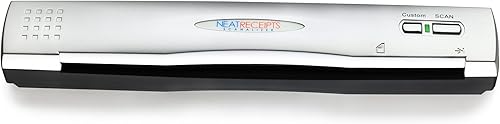
Beneficios clave de NeatReceipts Scanalizer Professional 2.5 Escáner y software para dispositivos móviles

  • La forma más fácil de gestionar los gastos, prepararse para los impuestos, crear informes de gastos y escanear tarjetas de visita--aceptado por el IRS
  • Escanea copias digitales permanentes de todos tus documentos financieros
  • Puede realizar un seguimiento de todos los tipos de documentos y extraerlos según sea necesario con la nueva función Organizador de documentos
  • Funciona con QuickBooks, Quicken, MS Money, Excel, PDF, Act!, y Peachtree
  • Incluye el software NeatReceipts y un escáner portátil de color y peso ligero, interfaz USB.
  • El número de Modelo (ItemModelNumber)
  • 899061P
  • La forma más fácil de gestionar los gastos
  • prepararse para los impuestos
  • crear informes de gastos y escanear tarjetas de visita--aceptado por el IRS
  • Funciona con QuickBooks
  • Quicken
  • MS Money
  • Excel
  • PDF
  • Act!
  • y Peachtree
  • Incluye el software NeatReceipts y un escáner portátil de color y peso ligero
  • interfaz USB.

Ficha técnica

Fabricante
The Neat Company
Dimensiones
5 x 8 x 14 pulgadas
SKU
B000BBCKOC
  • Compra segura y envío rápido a todo Colombia
  • Garantía Yaxa y soporte experto en tu NeatReceipts Scanalizer Professional 2.5 Escáner y software para dispositivos móviles
  • Atención personalizada por WhatsApp y canales oficiales.

Descripción detallada de NeatReceipts Scanalizer Professional 2.5 Escáner y software para dispositivos móviles

Descripción del producto Los gastos de forma más fácil de administrar, para preparar los impuestos, crear gasto informes y escanea tarjetas -- aceptado por el IRS scans permanente digital copias de todos sus papeles, puede mantener un seguimiento de todos los tipos de documentos financieros y Pull función de ellos hasta como sea necesario con el nuevo documento Organizador funciona con quickbooks, Quicken, ms dinero, Excel, PDF, actuar., y Peachtree incluye software de neatreceipts y un ligero, color, escáner portátil, interfaz USB Tienda Tienda Product Description Please note: A 3.0 software upgrade for the NeatReceipts Scanalizer will be released on October 15, 2007. You may purchase the software upgrade at the NeatReceipts website: Neatreceipts/Upgrade NeatReceipts Version 2.5 Professional is the easiest way for individuals and small businesses to manage expenses, prepare for taxes, create expense reports, and scan business cards. But it not all just for business--you can also use Neat Receipts for scrapbooking, archiving family recipes, and other family activities. NeatReceipts Version 2.5 Professional edition also includes a new Document Organizer feature in addition to Receipts, Business Card, and Tax Organizers features. Use NeatReceipts 2.5 to manage expenses, prepare for taxes, create expense reports, and scan business cards. View example. Organize expenses by IRS form and category. View example. Sync contact information into Outlook, Plaxo or vCard. View example. Scan receipts and save in digital spreadsheet format. View example. Scan documents, recipes, and more and then convert them to PDF. View example. How NeatRecipts can Make Your Life Easier Make permanent digital copies of all your financial papers NeatReceipts 2.5 comes with a high resolution portable scanner. All you have to do is scan your receipts, invoices, and other financial documents through this scanner, and our software will save permanent copies that you can depend on for years to come. Eliminate financial data entry, simplifies expense tracking Using patent-pending NeatScan technology, NeatReceipts 2.5 extracts all important information from each receipt including date, amount, vendor and payment type. It then organizes all this expense information into a searchable expense database. Speed up tax preparation NeatReceipts allows you to leave digital comments on receipts and mark them for tax purposes. During tax season, retrieve all the marked receipts with ease and review those comments for easy preparation. NeatReceipts stores each receipt in a secure digital format that is accepted by the IRS. Integrate with QuickBooks, Quicken, Money, Act!, Peachtree Export to QuickBooks, MS Money, Quicken and most other financial software. By automating data entry and making it easy to export to other software, NeatReceipts makes sure you never have to type information into your financial software again! Scan business cards NeatReceipts captures key contact information from business cards and syncs with your Outlook address book. You can also create V-cards to upload to your PDA. Automatically create expense reports Automatically creates expense reports from scanned receipts and attaches images of the original receipts for simple verification. Users can email these reports from within the software or export them into PDF, DOC, XLS or HTML formats. If you are looking for expense reporting software with in-built approval, analysis and administration capabilities, please consider NeatReceipts Enterprise. How NeatReciepts Works NeatScan Technology Using advanced Optical Character Recognition, NeatScan technology (patent pending) extracts key information from your receipts, such as date, amount, payment method, expense category and vendor. If you scan in business cards, NeatScan automatically pulls out information like name, company, address, phone numbers, email address etc. NeatScan actually learns to associate an expense category (such as meals or lodging) to a particular vendor (brands such as Starbucks or Hilton) so you don't have to type in the information each time. This ensures that your financial records are filed consistently and with minimal effort. Each user of NeatReceipts Professional 2.5 receives the NeatReceipts scanner--a lightweight, portable, durable color scanner. Our software was designed with this scanner in mind and offers the following unmatched functionality: Auto-sizes any scanned receipt or document. Auto-crops and auto-rotates any scanned receipt or document. Scan widthwise or lengthwise -- the image will appear upright in image viewer. Powered by USB port, so no plug needed (it's truly portable!). Scans quickly and easily without opening and closing scanner lid (flatbed). Small, portable and lightweight. Perfect for the office, the home and the road! What New with NeatRecipts 2.5 NeatReceipts Professional 2.5 offer many new features like recognition of credit cards by last 4 digits, simplified and enhanced Advanced Fast Find for your folder and receipts, and added printing options that let you print one to four images per page and choice of paper size. Just like its previous version, NeatReceipts Professional 2.5 includes a business card reader at no additional charge. Simply scan your business cards and sync your contact information automatically with your Outlook address book, or create a V-Card for your palm pilot. Version 2.5 has the added convenience of Plaxo integration, so you can just go online, click "sync with Plaxo" and have your contact information updated. New in business card features in version 2.5 include an improved interface and parsing, both black & white and color scanning, one-click e-mail to and browse-to options, and completed action item check box column. Also, for the first time, NeatReceipts Scanalizer Professional Version 2.5 also includes a document organizer so you can keep track of all types of documents and access them up as needed. Document Organizer features include: Black & White and Color Scanning Document copier Copy Document command Ability to combine documents together Ability to separate multi-page documents What's in the Box Scanner, carrying case, stand

From the Manufacturer NeatReceipts is the easiest way for individuals and small businesses to manage expenses, prepare for taxes, create expense reports and scan business cards. The NeatReceipts package includes the proprietary NeatReceipts software and a lightweight, color, portable scanner. Features:Makes permanent digital copies of all your financial papers: NeatReceipts comes with a free, high resolution portable scanner. All you have to do is scan your receipts, invoices and other financial documents through this scanner, and our software will save permanent copies that you can depend on for years to come! Eliminates financial data entry, simplifies expense tracking: Using patent-pending NeatScan technology, NeatReceipts extracts all important information from each receipt including date, amount, vendor and payment type. It then organizes all this expense information into a searchable expense database. Speeds up tax preparation: NeatReceipts allows you to leave digital comments on receipts and mark them for tax purposes. During tax season, retrieve all the marked receipts with ease and review those comments for easy preparation. NeatReceipts stores each receipt in a secure digital format that is accepted by the IRS. Integrates with QuickBooks, Quicken, Money, Act!, Peachtree: Export to QuickBooks, MS Money, Quicken and most other financial software. By automating data entry and making it easy to export to other software, NeatReceipts makes sure you never have to type information into your financial software again! Scan business cards: NeatReceipts captures key contact information from business cards and syncs with your Outlook address book. You can also create V-cards to upload to your PDA. Automatically creates expense reports: Automatically creates expense reports from scanned receipts and attaches images of the original receipts for simple verification. Users can email these reports from within the software or export them into PDF, DOC, XLS or HTML formats. If you are looking for expense reporting software with in-built approval, analysis and administration capabilities, please consider NeatReceipts Enterprise. NeatScan Technology Using advanced Optical Character Recognition, NeatScan technology (patent pending) extracts key information from your receipts, such as date, amount, payment method, expense category and vendor. If you scan in business cards, NeatScan automatically pulls out information like name, company, address, phone numbers, email address etc. NeatScan actually learns to associate an expense category (such as meals or lodging) to a particular vendor (brands such as Starbucks or Hilton) so you don't have to type in the information each time. This ensures that your financial records are filed consistently and with minimal effort. The NeatReceipts portable scanner Each user of NeatReceipts Professional receives the NeatReceipts scanner -- a lightweight, portable, durable color scanner. Our software was designed with this scanner in mind and offers the following unmatched functionality: Auto-sizes any scanned receipt or document. Auto-crops and auto-rotates any scanned receipt or document. Scan widthwise or lengthwise -- the image will appear upright in image viewer. Powered by USB port, so no plug needed (it's truly portable!). Scans quickly and easily without opening and closing scanner lid (flatbed). Small, portable and lightweight. Perfect for the office, the home and the road! Links receipt to expense A high resolution image of every receipt is stored right next to its corresponding expense. This makes verification of expense reports a snap! The receipts are stored in a secure digital format, and cannot be edited once scanned in. The IRS accepts our secure digital format and this means you can throw away your tax-related receipts once they are scanned into NeatReceipts. Business Card Reader NeatReceipts Professional now includes a business card reader at no additional charge! Simply scan your business cards and sync your contact information automatically with your Outlook address book, or create a V-Card for your palm pilot. Integrates with QuickBooks. Creates expense reports in PDF, XLS and more NeatReceipts Professional can export all extracted and entered information to: Intuit QuickBooks Intuit Quicken Microsoft Money Other accounting software (through IIF and CSV formats) Microsoft Outlook (for business card information) vCard format compatible with all handhelds (for business card information). In addition, expense reports can be created in a variety of formats, including: Microsoft Excel (XLS) Microsoft Word (RTF) Adobe Acrobat (PDF) Microsoft Access and other databases (CSV) Internet Explorer, Mozilla, Netscape (HTML) Advanced search for expense reports, receipts and business cards NeatReceipts has advanced search capabilities that allow you to find expense reports and receipts with any combination of criteria, including: Time period Project or Client information Total amount of expense report, total for any category or expense amount Expense purpose Payment class (billable, reimbursable, paid by company, personal, taxable) Payment type (cash, name of credit card, check) You can also find contact information from scanned business cards in any of the following criteria: Name Company and title Address Phone or fax number Email address ...and much more! What's in the Box: Scanner, carrying case, stand. Ver más

Características destacadas

  • La forma más fácil de gestionar los gastos, prepararse para los impuestos, crear informes de gastos y escanear tarjetas de visita--aceptado por el IRS
  • Escanea copias digitales permanentes de todos tus documentos financieros
  • Puede realizar un seguimiento de todos los tipos de documentos y extraerlos según sea necesario con la nueva función Organizador de documentos
  • Funciona con QuickBooks, Quicken, MS Money, Excel, PDF, Act!, y Peachtree
  • Incluye el software NeatReceipts y un escáner portátil de color y peso ligero, interfaz USB.
  • El número de Modelo (ItemModelNumber)
  • 899061P
  • La forma más fácil de gestionar los gastos
  • prepararse para los impuestos
  • crear informes de gastos y escanear tarjetas de visita--aceptado por el IRS
  • Funciona con QuickBooks
  • Quicken
  • MS Money
  • Excel
  • PDF
  • Act!
  • y Peachtree
  • Incluye el software NeatReceipts y un escáner portátil de color y peso ligero
  • interfaz USB.

Otros clientes también compraron